
Introduction to ChainTraced API
APIs are an interface that allows external systems, applications, and developers to interact with the platform. It facilitates integration and automation of supply chain emissions data management, quality management and other key functionalities offered.
ChainTraced offers 2 types of API interfaces for Interoperability purposes.
-
Standard APIs (CRUD)
This type of API is used for performing actions like:
-
Creating new data records.
-
Reading or retrieving existing data.
-
Updating data records.
-
Deleting data records.
You can think of it as a "Request-and-Response API" because it works when you (or your system) make a request to the platform, and the platform responds with the data or result of the action.
-
-
Callback API (or Webhook)
This type of API is used when the platform (ChainTraced) sends or "pushes" data to your system whenever specific events happen.
For example:-
Notifying your system when a certificate data is updated.
-
Sending updates about completed workflows for example status changes etc.
You can think of it as a "Push Notification API" because it pushes updates to your system automatically instead of waiting for you to ask.
-
The ChainTraced Standard API is a RESTful interface that enables developers to programmatically interact with the ChainTraced platform.
This API facilitates the integration of ChainTraced's supply chain traceability and quality management features into external applications and workflows.
Open API documentation.
For detailed information on available endpoints, request formats, authentication methods, and integration guidelines, refer to the official ChainTraced API documentation.
Create API keys
To use these ChainTraced APIs, you need an API key for authentication.
-
Click on your company name to trigger a drop down menu.
-
Select and Click "Manage API keys"
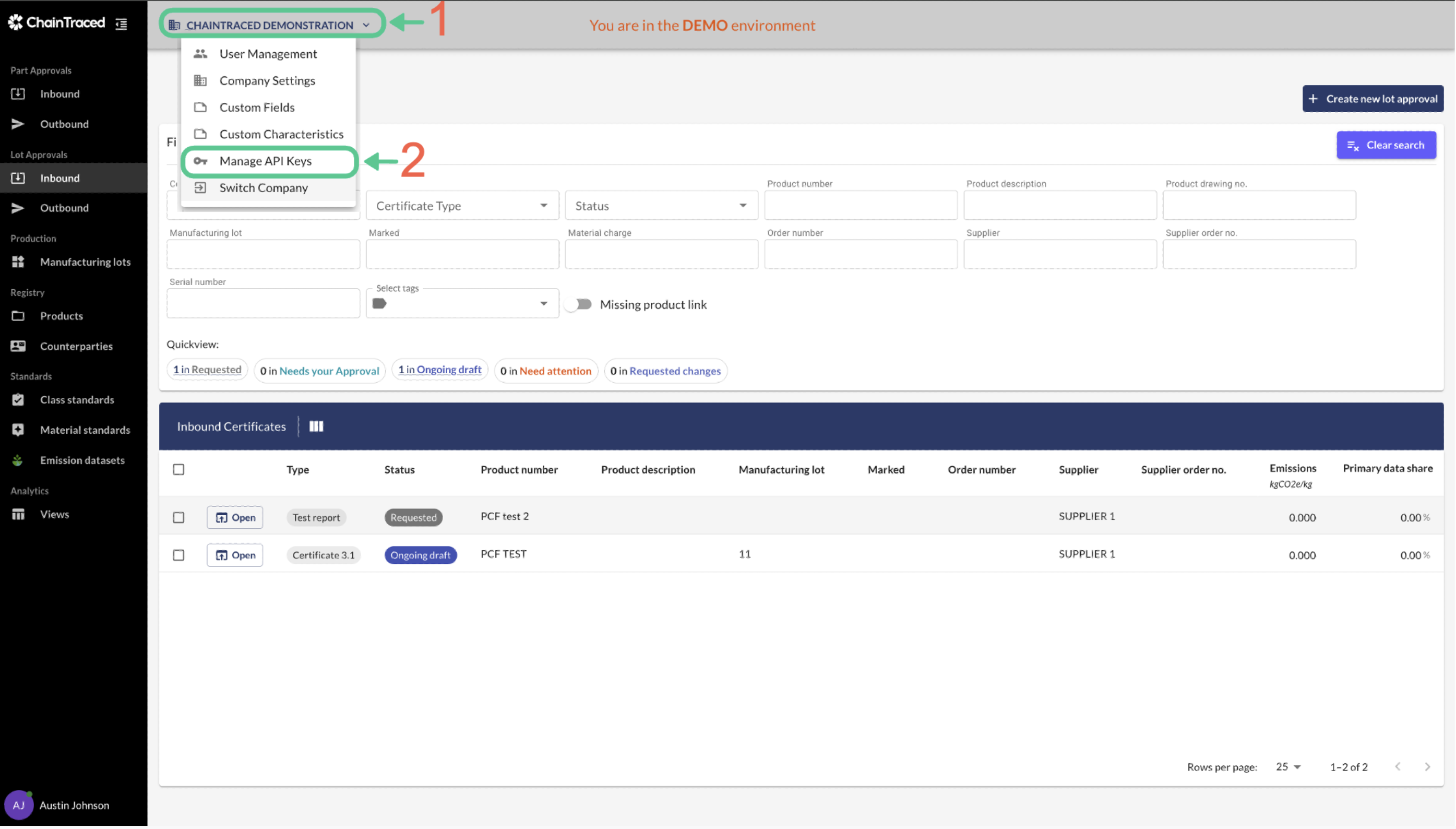
-
Fill in form to enable Create API button. First Name , Last Name and Role are mandatory fields that need to be filled, in order to create the API key.
-
Select a scope for the API key to control permissions.
-
Click Create API-key. COPY the code that will be displayed. It is only accessible once in this window, but if it is lost you can always remove the key and create a new one.
Setup Callbacks
ChainTraced Callback APIs (Webhooks) allow the platform to send data or notifications to your system automatically when specific events occur.
These are useful for real-time updates and automation.
Open API documentation.
For detailed information on available endpoints, request formats, authentication methods, and integration guidelines, refer to the official ChainTraced API documentation.
-
Set up an Endpoint
Create an endpoint in your system to receive webhook notifications.
Ensure the endpoint is accessible and uses HTTPS for security.
Share the URL endpoint with ChainTraced personnels. -
Authorisation Credentials
When registering the callback, provide an authorisation credential in 'Basic <base64 value>' to ChainTraced.
Example: Encode username:password in Base64 and include it as a header in your endpoint to verify incoming requests.
-
Handle Incoming Requests
Your endpoint will receive POST requests from ChainTraced.
Parse the data and handle it as needed (e.g., update your database, trigger workflows).